Lab Summary & Architecture Specifications
This production guide documents the end-to-end implementation of an AWS VPC Transit Gateway (TGW) hub-and-spoke networking topology. By deploying a centralized Transit Gateway (tgw-0239c0e4cb62ee813), cross-VPC communication between multiple isolated Virtual Private Clouds (VPC-A, VPC-B, and VPC-C) is established without requiring an unmanageable mesh of individual VPC peering connections.
The guide also covers private subnet isolation, supernet routing (10.0.0.0/8), public egress via Internet Gateway (igw-0a9f6600e3e92354b), and hybrid bridging with Amazon Lightsail workloads.
                           ┌─────────────────────────────────────────┐
                           │          INTERNET / CLIENTS             │
                           └────────────────────┬────────────────────┘
                                                │
                                                ▼
                                    ┌───────────────────────┐
                                    │ Internet Gateway (IGW)│
                                    │  igw-0a9f6600e3e92354b│
                                    └───────────┬───────────┘
                                                │ (0.0.0.0/0)
                                                ▼
┌──────────────────────────────────────────────────────────────────────────────────────────────┐
│ AWS REGION: Asia Pacific (Mumbai) • ap-south-1 • Account: 612715201375                        │
│                                                                                              │
│   ┌────────────────────────────────┐                 ┌────────────────────────────────┐      │
│   │ VPC-A (vpc-0140dbcfabacc4655)  │                 │ VPC-C (vpc-0ecdf598790d4dc95)  │      │
│   │ CIDR: 10.10.0.0/16             │                 │ CIDR: 10.30.0.0/16             │      │
│   │ Subnet: public-subnet-VPCA     │                 │ Subnet: private-subnet-VPCC    │      │
│   │ (subnet-0088028c06f3a22d6)     │                 │ (subnet-050262592966b457d)     │      │
│   │ Route Table: vpcA-public-RT    │                 │ Route Table: VPC C RT          │      │
│   │ (rtb-09759f1049961bf9d)        │                 │ (rtb-04ca3dcd2be802cfc)        │      │
│   └──────────────┬─────────────────┘                 └────────────────┬───────────────┘      │
│                  │                                                    │                      │
│                  │ Attachment: tgw-attach-vpcA                        │ Attachment:          │
│                  │ (10.0.0.0/8 -> TGW)                                │ tgw-attach-vpcC      │
│                  │                                                    │ (10.0.0.0/8 -> TGW)  │
│                  ▼                                                    ▼                      │
│        ══════════════════════════════════════════════════════════════════════════════        │
│                    AWS TRANSIT GATEWAY HUB: tgw-0239c0e4cb62ee813                     │
│                    Centralized Router • BGP / ECMP Capable (50 Gbps/VPC)             │
│        ══════════════════════════════════════════════════════════════════════════════        │
│                                           ▲                                                  │
│                                           │ Attachment: tgw-attach-vpcB                      │
│                                           │ (10.0.0.0/8 -> TGW)                              │
│                                           │                                                  │
│                           ┌───────────────┴────────────────┐                                 │
│                           │ VPC-B (vpc-084d0a5f9b51ade9a)  │                                 │
│                           │ CIDR: 10.20.0.0/16             │                                 │
│                           │ Subnet: private-subnet-VPCB    │                                 │
│                           │ (subnet-05706cef59f9cd3ba)     │                                 │
│                           └────────────────────────────────┘                                 │
│                                                                                              │
│   ┌────────────────────────────────┐                 ┌────────────────────────────────┐      │
│   │ Default VPC (vpc-06d4e64c3e89) │ ◄─VPC Peering─► │ Amazon Lightsail (ap-south-1a) │      │
│   │ subnets: subnet-0832fbd4ca6f,  │                 │ lightsail-app-01               │      │
│   │ subnet-04ce09b68e85,           │                 │ Private: 172.26.14.33          │      │
│   │ subnet-055db5eb98b2            │                 │ Public: 15.206.146.237         │      │
│   └────────────────────────────────┘                 └────────────────────────────────┘      │
└──────────────────────────────────────────────────────────────────────────────────────────────┘
Resource Configuration Matrix
| Component |
AWS Resource ID |
Name / Purpose |
Associated CIDR / Target |
| AWS Region |
ap-south-1 |
Asia Pacific (Mumbai) |
- |
| AWS Account ID |
612715201375 |
Production Admin (akhilJ) |
- |
| Transit Gateway |
tgw-0239c0e4cb62ee813 |
Central Hub Router |
Routes 10.0.0.0/8 across VPCs |
| VPC-A (Public Hub) |
vpc-0140dbcfabacc4655 |
Edge Ingress / Public Services |
10.10.0.0/16 |
| VPC-B (App Tier) |
vpc-084d0a5f9b51ade9a |
Internal Backend Tier |
10.20.0.0/16 |
| VPC-C (Data Tier) |
vpc-0ecdf598790d4dc95 |
Isolated Database / Core Workloads |
10.30.0.0/16 |
| Public Subnet A |
subnet-0088028c06f3a22d6 |
public-subnet-VPCA |
Associated with rtb-09759f1049961bf9d |
| Private Subnet B |
subnet-05706cef59f9cd3ba |
private-subnet-VPCB |
Isolated Spoke Attachment |
| Private Subnet C |
subnet-050262592966b457d |
private-subnet-VPCC |
Associated with rtb-04ca3dcd2be802cfc |
| Internet Gateway |
igw-0a9f6600e3e92354b |
VPC-A Public Internet Egress |
Default Route 0.0.0.0/0 |
| Lightsail Instance |
lightsail-app-01 |
Ubuntu 24.04 Web App |
Public: 15.206.146.237, Private: 172.26.14.33 |
1. VPC & Subnet Design Strategy
When architecting scalable cloud networks, creating separate VPCs for each lifecycle tier or domain provides robust security isolation. However, inter-connecting them requires a deterministic IP addressing plan that allows route summarization.
In our implementation:
10.10.0.0/16 is allocated to VPC-A (Public DMZ & Shared Ingress).10.20.0.0/16 is allocated to VPC-B (Application Compute Tier).10.30.0.0/16 is allocated to VPC-C (Database and Storage Tier).10.0.0.0/8 is used as the Supernet Summary Route pointing to the Transit Gateway, enabling any current and future VPC in the 10.x.x.x space to automatically communicate via the hub without needing individual /16 route entries.
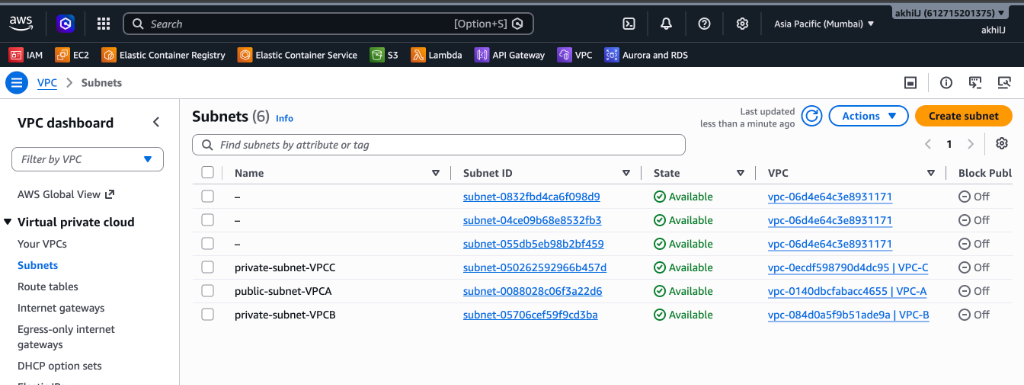 Figure 1 — AWS Management Console Subnets view showing custom subnets
 public-subnet-VPCA, private-subnet-VPCB, private-subnet-VPCC, and the default VPC subnets.
Verified Subnet Associations
-
public-subnet-VPCA (subnet-0088028c06f3a22d6):
- VPC:
vpc-0140dbcfabacc4655 (VPC-A)
- Explicitly associated with route table
rtb-09759f1049961bf9d.
- Has direct internet access via attached Internet Gateway
igw-0a9f6600e3e92354b.
-
private-subnet-VPCB (subnet-05706cef59f9cd3ba):
- VPC:
vpc-084d0a5f9b51ade9a (VPC-B)
- Fully private; relies on Transit Gateway for egress or inter-VPC traffic.
-
private-subnet-VPCC (subnet-050262592966b457d):
- VPC:
vpc-0ecdf598790d4dc95 (VPC-C)
- Explicitly associated with route table
rtb-04ca3dcd2be802cfc.
- Fully private; secure back-channel database connectivity.
2. Transit Gateway Architecture & Supernet Routing
Why Transit Gateway Over VPC Peering?
- Full Mesh Peering Complexity: Connecting $N$ VPCs requires $\frac{N(N-1)}{2}$ peering connections. For 10 VPCs, that requires 45 peering links and hundreds of route table updates. Peering also does not support transitive routing (VPC A $\rightarrow$ VPC B $\rightarrow$ VPC C is forbidden).
- Transit Gateway Simplicity: Acts as a regional virtual router. Each VPC creates a single VPC Attachment to
tgw-0239c0e4cb62ee813. All traffic between any spokes flows transitively through the central gateway at speeds up to 50 Gbps per VPC attachment with Equal-Cost Multi-Path (ECMP) support.
VPC-A Route Table Configuration (vpcA-public-RT)
VPC-A serves as the public ingress point. Its route table rtb-09759f1049961bf9d contains three active routes:
10.10.0.0/16 $\rightarrow$ local (Intra-VPC traffic).0.0.0.0/0 $\rightarrow$ igw-0a9f6600e3e92354b (Outbound Internet traffic).10.0.0.0/8 $\rightarrow$ tgw-0239c0e4cb62ee813 (Routes all traffic destined for VPC-B 10.20.0.0/16 and VPC-C 10.30.0.0/16 to the Transit Gateway).
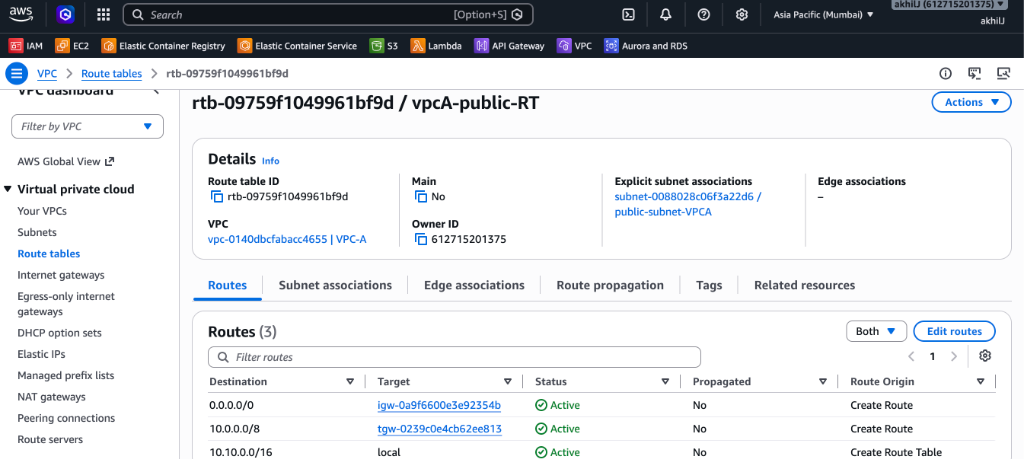 Figure 2 — Route Table
 rtb-09759f1049961bf9d for VPC-A displaying the supernet route 10.0.0.0/8 targeted to tgw-0239c0e4cb62ee813.
VPC-C Route Table Configuration (VPC C RT)
VPC-C hosts sensitive databases or private services. Its route table rtb-04ca3dcd2be802cfc has no Internet Gateway route, ensuring complete network isolation from the public web while maintaining connectivity with other VPCs via the Transit Gateway:
10.30.0.0/16 $\rightarrow$ local (Intra-VPC traffic).10.0.0.0/8 $\rightarrow$ tgw-0239c0e4cb62ee813 (Routes all responses and inter-VPC traffic destined for 10.10.0.0/16 or 10.20.0.0/16 through the Transit Gateway).
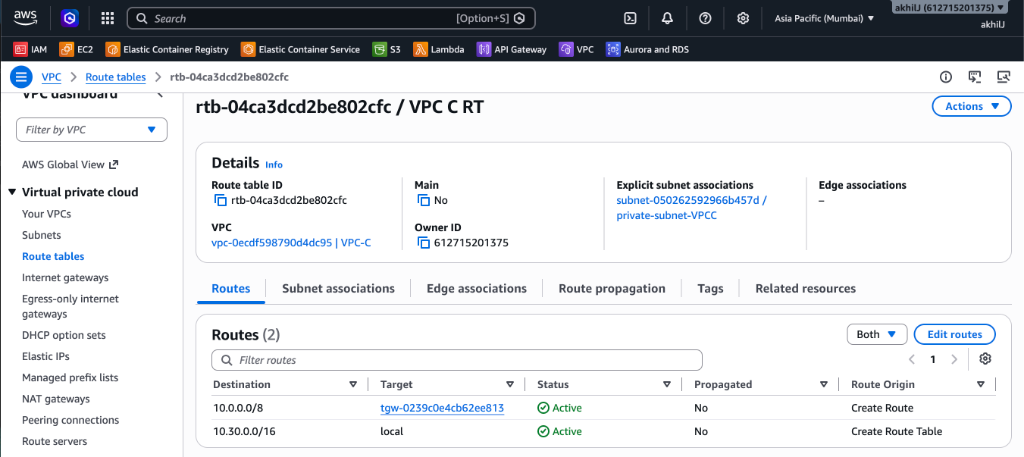 Figure 3 — Route Table
 rtb-04ca3dcd2be802cfc for VPC-C showing private local routing and supernet routing via tgw-0239c0e4cb62ee813.
3. Step-by-Step Implementation Guide
Step 1: Provision the AWS Transit Gateway
Using AWS CLI or Management Console:
aws ec2 create-transit-gateway \
    --description "Production Hub Transit Gateway" \
    --options AmazonSideAsn=64512,AutoAcceptSharedAttachments=enable,DefaultRouteTableAssociation=enable,DefaultRouteTablePropagation=enable,DnsSupport=enable,VpnEcmpSupport=enable \
    --tag-specifications 'ResourceType=transit-gateway,Tags=[{Key=Name,Value=production-tgw-hub}]' \
    --region ap-south-1
Note: The generated Transit Gateway ID is tgw-0239c0e4cb62ee813.
Step 2: Create VPC Attachments for Spokes
Attach each VPC to the Transit Gateway by selecting dedicated subnets in each Availability Zone:
# Attach VPC-A (Public Hub)
aws ec2 create-transit-gateway-vpc-attachment \
    --transit-gateway-id tgw-0239c0e4cb62ee813 \
    --vpc-id vpc-0140dbcfabacc4655 \
    --subnet-ids subnet-0088028c06f3a22d6 \
    --tag-specifications 'ResourceType=transit-gateway-attachment,Tags=[{Key=Name,Value=tgw-attach-vpcA}]' \
    --region ap-south-1

# Attach VPC-B (App Tier)
aws ec2 create-transit-gateway-vpc-attachment \
    --transit-gateway-id tgw-0239c0e4cb62ee813 \
    --vpc-id vpc-084d0a5f9b51ade9a \
    --subnet-ids subnet-05706cef59f9cd3ba \
    --tag-specifications 'ResourceType=transit-gateway-attachment,Tags=[{Key=Name,Value=tgw-attach-vpcB}]' \
    --region ap-south-1

# Attach VPC-C (Database Tier)
aws ec2 create-transit-gateway-vpc-attachment \
    --transit-gateway-id tgw-0239c0e4cb62ee813 \
    --vpc-id vpc-0ecdf598790d4dc95 \
    --subnet-ids subnet-050262592966b457d \
    --tag-specifications 'ResourceType=transit-gateway-attachment,Tags=[{Key=Name,Value=tgw-attach-vpcC}]' \
    --region ap-south-1
Add the supernet summary route 10.0.0.0/8 pointing to tgw-0239c0e4cb62ee813 on each spoke route table:
# Update VPC-A Route Table (rtb-09759f1049961bf9d)
aws ec2 create-route \
    --route-table-id rtb-09759f1049961bf9d \
    --destination-cidr-block 10.0.0.0/8 \
    --transit-gateway-id tgw-0239c0e4cb62ee813 \
    --region ap-south-1

# Update VPC-C Route Table (rtb-04ca3dcd2be802cfc)
aws ec2 create-route \
    --route-table-id rtb-04ca3dcd2be802cfc \
    --destination-cidr-block 10.0.0.0/8 \
    --transit-gateway-id tgw-0239c0e4cb62ee813 \
    --region ap-south-1
4. Amazon Lightsail Hybrid Integration
In hybrid and cost-optimized multi-tier architectures, frontend edge applications or microservices may be deployed on Amazon Lightsail while connecting to private backend VPC resources.
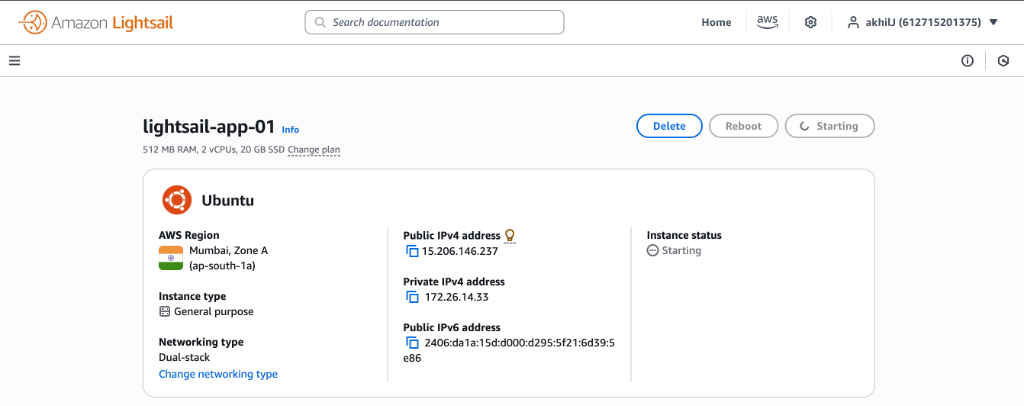 Figure 4 — Amazon Lightsail instance
 lightsail-app-01 running Ubuntu in Mumbai (ap-south-1a) with Public IP 15.206.146.237 and Private IP 172.26.14.33.
Lightsail Network Specifications
- Instance:
lightsail-app-01
- Region/AZ: Mumbai Zone A (
ap-south-1a)
- Public IPv4:
15.206.146.237
- Private IPv4:
172.26.14.33 (Lightsail default private subnet 172.26.0.0/16)
- Public IPv6:
2406:da1a:15d:d000:d295:5f21:6d39:5e86
Enabling Cross-Communication from Lightsail to VPCs:
- In the Lightsail Console, navigate to Account $\rightarrow$ Advanced $\rightarrow$ VPC Peering.
- Enable VPC Peering in
ap-south-1. This creates an automatic peering connection between the Lightsail network (172.26.0.0/16) and the Default VPC (vpc-06d4e64c3e8931171).
- To route traffic from Lightsail through to VPC-A, VPC-B, or VPC-C:
- Attach the Default VPC (
vpc-06d4e64c3e8931171) to tgw-0239c0e4cb62ee813.
- Add route
10.0.0.0/8 $\rightarrow$ tgw-0239c0e4cb62ee813 in the Default VPC route table.
- Add reverse route
172.26.0.0/16 in the Transit Gateway route table pointing to the Default VPC attachment.
5. Security Groups & Verification
Security Group Ingress Rules for Cross-VPC Traffic
Ensure Security Groups on EC2 instances or database instances in VPC-C allow ingress from VPC-A and VPC-B:
Type: Custom TCP
Port Range: 3306 / 5432 / 8080 / 443
Source: 10.0.0.0/8 (or specific CIDR 10.10.0.0/16)
Description: "Allow Transit Gateway spoke communication"
Connectivity Testing Commands
From an EC2 instance in VPC-A (10.10.1.50):
# 1. Test ICMP Ping to VPC-C Private Host (10.30.1.100)
ping -c 4 10.30.1.100

# 2. Trace packet path to confirm Transit Gateway hop
traceroute -n 10.30.1.100

# Expected Output:
# 1  10.10.0.1 (VPC Gateway Router)  0.354 ms
# 2  10.0.x.x  (Transit Gateway ENI) 0.842 ms
# 3  10.30.1.100 (VPC-C Destination)  1.120 ms

# 3. Test TCP Port Connectivity (Database or API service)
nc -zv -w 3 10.30.1.100 5432
# Connection to 10.30.1.100 port 5432 [tcp/postgresql] succeeded!
6. Key Takeaways & Best Practices
- Route Summarization (
10.0.0.0/8):
Always assign contiguous, non-overlapping RFC 1918 CIDR blocks (10.10.0.0/16, 10.20.0.0/16, 10.30.0.0/16) to enable single supernet routes in spoke route tables.
- Dedicated Transit Gateway Subnets:
Best practice recommends creating small, dedicated subnets (e.g.,
/28) in each AZ specifically for Transit Gateway ENIs to maintain clean network segmentation.
- Appliance Mode for Stateful Firewalls:
When routing through centralized inspection VPCs or Network Firewalls, enable
ApplianceModeSupport=enable on the VPC attachment to guarantee symmetric bidirectionally routed flows.
- Bandwidth & MTU:
Transit Gateway supports up to 50 Gbps per VPC attachment and Jumbo Frames with an MTU of 8500 bytes for high-throughput intra-cloud communication.
📥 Download Offline PDF Guide:
You can download the complete offline documentation with diagrams and configuration sheets at /downloads/AWS_VPC_Transit_Gateway_Lab_Guide.pdf.