The Complete Beginner's Guide to Cloud Migration: The 6 R's, Strategy, and Step-by-Step Roadmap
A friendly, visual guide to moving applications from on-premises datacenters to AWS Cloud. Learn the famous 6 R's of migration (Rehost, Replatform, Refactor, etc.), key AWS migration tools, and a practical 4-phase execution blueprint with animated diagrams.
Study Progress
Mark this module as reviewed for your cloud exam/team prep
What is Cloud Migration? (In Plain English)
Imagine you are currently living in a rented house where you are responsible for fixing the plumbing, fixing the roof during storms, replacing the electricity generator when power drops, and paying upfront for furniture you might outgrow in a year.
That is on-premises IT infrastructure. Your company purchases expensive physical server racks, leases datacenter floor space, pays for continuous cooling and electricity, and hires teams to swap failed hard drives.
Cloud Migration is like moving into a modern, fully serviced apartment where electricity, water, security, and air conditioning are managed 24/7 by experts (AWS, GCP, Azure), and you only pay for the exact rooms and utilities you turn on.
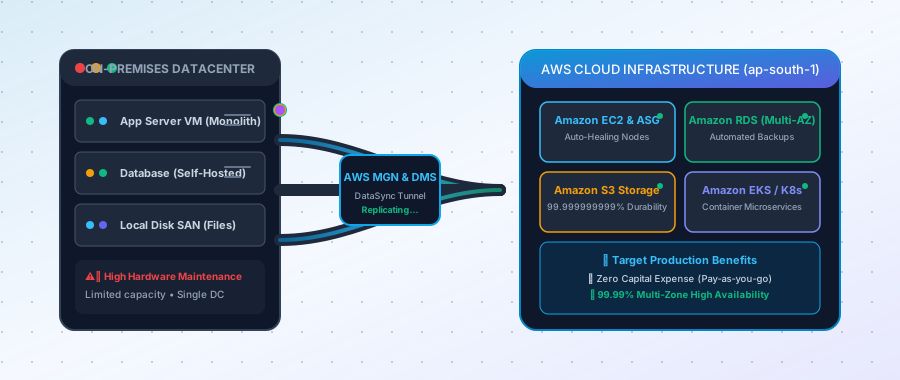 Figure 1 — Moving legacy on-premises servers to AWS Cloud with automated data replication and zero downtime.
Why Do Businesses Migrate to the Cloud?
- Cost Agility (Shift from CapEx to OpEx):
Instead of spending $100,000 upfront on physical servers that sit idle 80% of the day, you pay by the second for compute power you actually use. - Instant Global Scalability:
If your app suddenly goes viral, AWS can automatically spin up 50 new server instances in 60 seconds and spin them down when traffic subsides. - High Availability & Disaster Recovery:
Your data is automatically mirrored across multiple distinct physical availability zones, protecting your business from power outages and hardware failures. - Faster Innovation:
Developers can launch databases, AI models, and caching layers with a single click or a line of code instead of waiting 6 weeks for physical hardware procurement.
The Famous "6 R's" of Cloud Migration
When migrating hundreds of applications, you don't treat them all the same way. AWS categorized the 6 classic strategies known worldwide as the 6 R's:
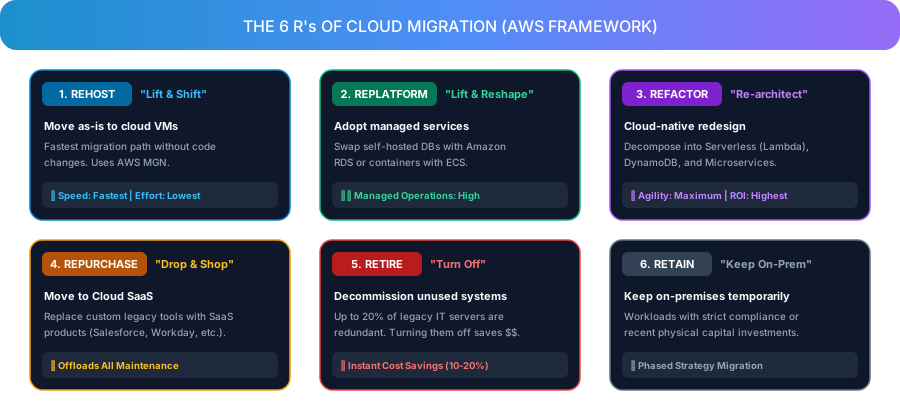 Figure 2 — The 6 R's decision matrix for selecting the optimal migration path.
1. Rehost ("Lift-and-Shift")
- What it is: Taking your existing virtual machines and copying them as-is into cloud instances (Amazon EC2).
- Analogy: Loading your existing furniture into a moving truck and placing it in your new home without changing anything.
- Best For: Fast migrations with tight deadlines (e.g., datacenter lease expiring).
- AWS Tool: AWS Application Migration Service (AWS MGN).
2. Replatform ("Lift-and-Reshape")
- What it is: Moving to the cloud while making minor optimizations to swap self-managed software for cloud-managed equivalents (like moving a self-installed MySQL database to Amazon RDS).
- Analogy: Moving to a new house and replacing your old manual water heater with a smart, automated central system.
- Best For: Reducing database maintenance and operating overhead without touching core application code.
3. Refactor / Re-architect ("Cloud Native")
- What it is: Re-writing and modernizing the application to take full advantage of cloud-native services like AWS Lambda (Serverless), Amazon DynamoDB, or Kubernetes (EKS).
- Analogy: Redesigning an old car from gas to an electric vehicle with regenerative braking.
- Best For: Mission-critical core products that require extreme elasticity and high development velocity.
4. Repurchase ("Drop-and-Shop")
- What it is: Abandoning a custom or self-hosted legacy tool and switching to an existing SaaS product (e.g., moving from an old self-hosted CRM to Salesforce, or self-hosted email to Google Workspace / Microsoft 365).
- Analogy: Selling your old bicycle and buying a gym membership.
5. Retire ("Turn it Off")
- What it is: Identifying and decommissioning servers and applications that are no longer used by any active team.
- Fact: In most legacy corporate datacenters, 10% to 20% of servers are completely zombie workloads that nobody uses! Turning them off saves money immediately.
6. Retain ("Keep on Premises")
- What it is: Keeping certain legacy workloads on-premises temporarily due to strict compliance requirements, heavy legacy dependencies, or recent major capital investments.
The 4-Phase Migration Roadmap
A successful cloud migration follows a structured, risk-mitigated phased roadmap:
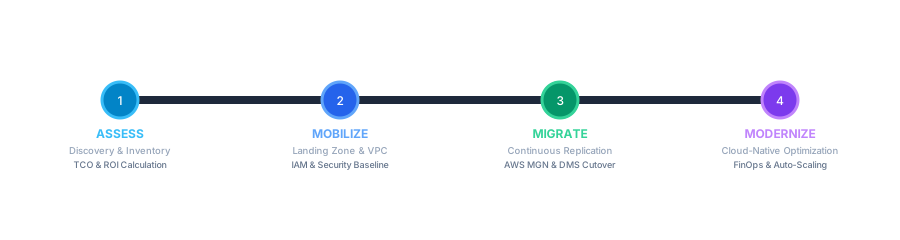 Figure 3 — Phased migration execution lifecycle from assessment to modernization.
Phase 1: Assess & Discover
- Scan your current network using discovery tools to build an exact inventory of all running servers, memory usage, CPU load, and network dependencies.
- Calculate Total Cost of Ownership (TCO) and estimate monthly cloud operational bills using the AWS Pricing Calculator.
Phase 2: Mobilize & Landing Zone Setup
- Set up your AWS Multi-Account Landing Zone (via AWS Control Tower or Organizations).
- Establish your secure networking baseline: VPC, Subnets, and AWS Transit Gateway for cross-VPC communication.
- Configure Identity & Access Management (IAM) with least-privilege policies.
Phase 3: Migration Execution & Data Sync
- Install lightweight replication agents on source servers.
- AWS Application Migration Service (AWS MGN) continuously syncs block storage to AWS in the background without disturbing live users.
- AWS Database Migration Service (AWS DMS) performs continuous Change Data Capture (CDC) to keep cloud databases in sync with on-prem databases.
- Perform a quick cutover during a 10-minute maintenance window and update DNS records in Route 53.
Phase 4: Modernize & Optimize (FinOps)
- Turn off on-premises hardware.
- Review AWS Cost Explorer and configure Auto Scaling Groups so servers power down during off-peak night hours.
- Purchase AWS Savings Plans or Reserved Instances to save up to 72% on compute costs.
Must-Know AWS Migration Tools Cheat Sheet
| AWS Tool | What it Does | Real-World Use Case |
|---|---|---|
| AWS MGN (App Migration) | Replicates physical/VM disks to Amazon EC2 | Fast Lift & Shift server migration |
| AWS DMS (Database Migration) | Syncs relational & NoSQL databases with zero downtime | Moving on-prem MySQL/Postgres to Amazon RDS |
| AWS DataSync | Accelerates massive file & object data transfers | Syncing multi-terabyte NAS/SAN shares to Amazon S3 |
| AWS Snowball | Physical ruggedized storage appliance shipped to your DC | Transferring 50TB - 100TB+ when internet bandwidth is slow |
| AWS Migration Hub | Centralized dashboard tracking progress of all migrations | Single pane of glass for enterprise PMs & engineers |
Top 3 Mistakes Beginners Make (And How to Avoid Them)
-
Treating Cloud Exactly Like On-Premises:
Mistake: Leaving giant EC2 servers running 24/7 at 100% fixed capacity.
Fix: Implement Auto Scaling Groups and schedule non-production staging environments to shut down outside working hours. -
Neglecting Multi-Zone High Availability:
Mistake: Deploying all application instances into a single Availability Zone (e.g.ap-south-1aonly).
Fix: Always place backends behind an Application Load Balancer or Lightsail Load Balancer spanning at least 2 Availability Zones. -
Skipping Least-Privilege IAM Security:
Mistake: Sharing root AWS credentials or using wildcard*admin policies for developer access.
Fix: Create specific IAM roles with role-based access control and enforce Multi-Factor Authentication (MFA).
Conclusion & Next Steps
Cloud migration is not a one-time event—it is a transformation journey. By starting with a simple Rehost (Lift & Shift) migration, you can quickly decommission physical servers, gain immediate disaster recovery benefits, and gradually Replatform and Refactor your microservices at your own pace.
📘 Ready to dive deeper into hands-on cloud networking?
Check out my production guide on AWS VPC Transit Gateway Multi-VPC Architecture or learn about Amazon Lightsail High Availability Load Balancers.
Related Tags

Akhil Jayaraj
AWS Cloud & DevOps Engineer
Architecting resilient multi-VPC AWS networks, Kubernetes infrastructure, and high-scale SaaS backends.
View About Me